
A series of stimulating sessions that address topical workplace issues

Explore upcoming events

You will not be able to benefit from these instructions unless you know how to adjust your chair. If you are unfamiliar with the controls, consult your Health & Safety Advisor or chair supplier. – Avoid sustained static postures. Remember that even appropriate postures become inappropriate when maintained for too long.
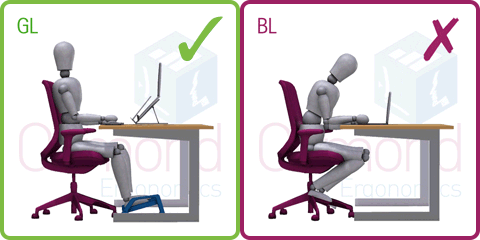
GL. A separate keyboard and mouse will make a significant improvement to layout flexibility. By using one of the proprietary laptop stands to tilt the computer, it is also possible to raise the screen to an acceptable height and viewing distance.

BL. Laptop use is a major source of musculoskeletal problems. Using a laptop on its own for any length of time will inevitably cause poor posture which in turn is likely to lead to head, neck and/or back pain. Despite the name, using a laptop computer on your lap is not recommended!

Ergonomics Live: How a Floor Walk Delivered Immediate Impact

The Challenge

A technical team operates in a highly controlled indoor environment, undertaking a combination of intensive screen work and physical tasks involving delicate materials.

Despite having adjustable desks, ergonomic seating, regular DSE assessments and manual handling training, management wanted an independent review to ensure that workstation setups and working habits had not drifted over time.

Our Approach

Osmond Ergonomics & Wellbeing delivered a half-day Ergonomics in Practice Floor Walk, combining:

  • A practical workshop on posture, fatigue and workstation setup
  • One-to-one workstation reviews carried out in the live working environment

Advice was tailored to the team’s specialist equipment, space limitations and physical demands.

The Impact

Out of 14 staff, approximately 50% of workstations were adjusted on the day.

These small but critical changes, including chair height, screen position, and input device placement, immediately reduced strain and improved comfort. The session also refreshed awareness of good working habits, helping prevent the slow return of poor posture that leads to musculoskeletal issues.

Client Feedback

“The session was perfectly pitched for the team. The preparation beforehand made it highly relevant, which is why the team were so engaged.”

Why This Matters

Even in well-managed workplaces, ergonomic drift is common. A simple floor walk delivers quick, measurable improvements that protect wellbeing, reduce injury risk, and boost productivity.

As many services move towards virtual delivery for speed and convenience, this case also highlights the enduring value of being physically present in the working environment. Observing people at work and providing live, individualised feedback allows for nuanced, practical adjustments that simply cannot be replicated remotely.

That’s what makes our floor walking service so valuable and impactful for both individuals and organisations.