
Seating Posture
Seating Posture
You will not be able to benefit from these instructions unless you know how to adjust your chair. If you are unfamiliar with the controls, consult your Health & Safety Advisor or chair supplier. – Avoid sustained static postures. Remember that even appropriate postures become inappropriate when maintained for too long.
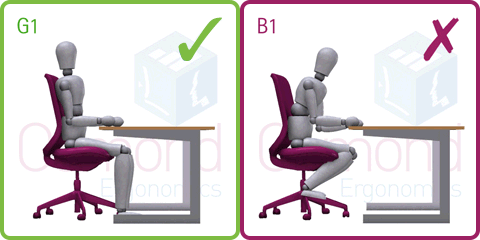
G1. Move the chair close to the desk and sit back on the seat. Adjust the chair back so that the upper body is relaxed and supported. Raise the chair seat so that, with the upper arms vertical, the elbows are level with or just above the desk.
B1. Sitting with the chair too low and too far from the desk encourages a slouched posture with no support from the chair back. The head is tilted forward. Feet are hooked around the chair base restricting blood circulation in the legs. Shoulders may be hunched.
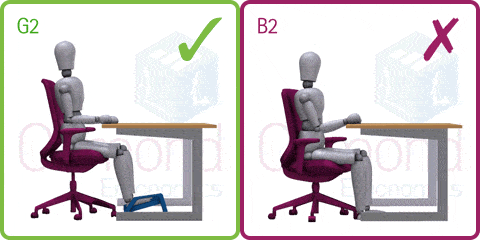
G2. Set the chair position and height as described in G1 above. Use a foot rest if the feet do not touch the ground. Height-adjustable chair arms provide additional supportfor the upper body when not keying. If the armrests restrict desk access, consider removing them altogether.
B2. Shorter people often set the chair height so that their feet are firmly on the floor. If this is too low for the desk, it is likely to result in arms stretched forwards (or sideways) and/or shoulder lifting. This causes undue muscle tension.
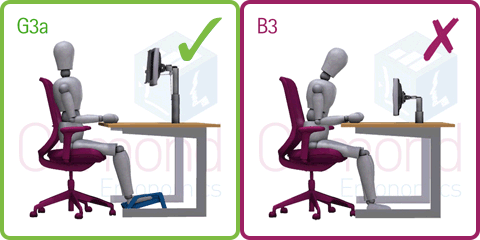
G3a. TOUCH TYPISTS can raise the monitor so that the visible screen top is just below eye level. Any document holder should be at screen height and in the same focal plane to minimise head twisting and tilting. COPY TYPISTS may prefer the screen to one side and the document holder directly in front of the head/neck and upper body. Provided it does not cause reflection problems, the monitor may also be tipped back slightly.
B3. If the monitor is set too low there is a tendency to work with the head tilted downwards putting strain on the neck and upper back. The whole body may also lean forward, moving away from the support of the chair back and encouraging slouching.
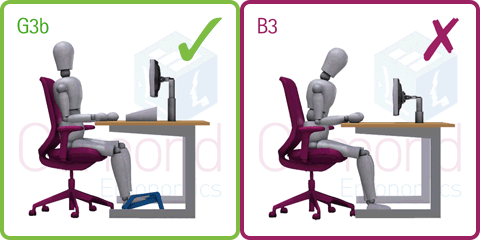
G3b. “HUNT AND PECK” TYPISTS who need to look at the keyboard may want to position the monitor lower to minimise “nodding” between the two. The document holder should be placed between the monitor and keyboard to avoid twisting.
B3. If the monitor is set too low there is a tendency to work with the head tilted downwards putting strain on the neck and upper back. The whole body may also lean forward, moving away from the support of the chair back and encouraging slouching.